New UPS Shipping Label Login Process
Starting September 14, 2026, the process used to log in to UPS to generate and print shipping labels will change. Step-by-step instructions are provided below in the "How to Activate an Account to use UPS EZ-Ship" and "How to Generate a UPS Shipping Label" section. If you need assistance, please contact us at 402-472-1434 or vdc2@unl.edu.
This change is being implemented to enhance the security of our shipping operations and ensure we can continue to offer discounted shipping to our clients. We appreciate your understanding.
Content
Save on shipping by using UPS EZ-Ship
For our clients’ convenience, the NVDC has partnered with United Parcel Service (UPS) to offer online access to printed shipping labels. This service is only for current veterinary clients. If you are not a current client, please contact us at 402-472-1434 for instructions on how you can use EZship.
With this service you may:
- Choose ground or next day air as the method of shipment.
- Print the label at your site immediately--no waiting.
- Pay a reduced flat rate for shipping to NVDC regardless of the origin of the package. The charges will be included in your monthly statement.
UPS EZ-Ship options | ||
|---|---|---|
| Method of shipment | Weight Category | Cost/box |
| UPS Ground | Small < 15 lb | $10 |
| Medium 15-24 lb | $15 | |
| Large 25-35 lb | $20 | |
Extra Large > 35 lb | Billed at cost | |
| UPS Next Day Air | Small < 15 lb | $28 |
| Medium 15-24 lb | $40 | |
Large 25-35 lb | $55 | |
| Extra Large > 35 lb | Billed at cost | |
| *Prices are subject to change without notice. | ||
Activate Account
How to Activate an Account to use UPS EZ-Ship
This set of steps only need to be completed once. Once you have activated your account, go to the next section "How to Generate a UPS EZ-Ship Label."
- If you are a new client to the NVDC, please contact us at 402-472-1434 to become a client and obtain access to use UPS EZ-Ship.
- If you are a current client but did not receive an invitation to our new UPS EZ-Ship website or would like a new invitation sent to your clinic, please contact us at vdc2@unl.edu and ask for access to UPS EZ-Ship. Include your clinic’s email address and account number or name.
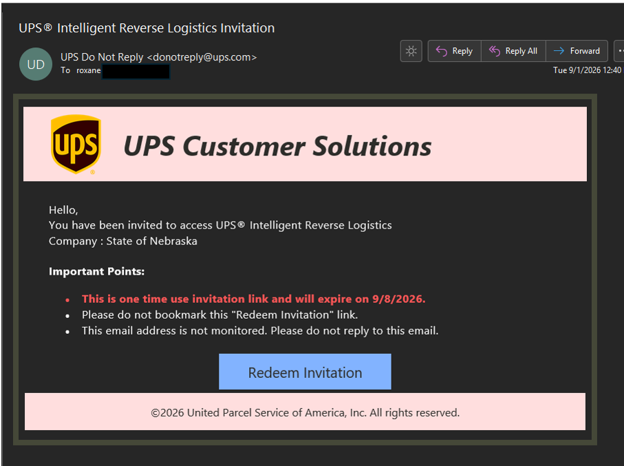
- Once you receive an email invitation from UPS, which will look like the image below, please follow the instructions in the video linked in Step 4.
- Please review the video below on how to set up your account with UPS on the NVDC EZ-Ship site.
How to Generate a UPS EZ-Ship Label
Visit our custom UPS site, and log in to create your label
- Log into your UPS account.
- Under "UPS Service" choose either Ground or Next Day Air from the drop-down menu.
- Under "Package 1," fill in weight and submission type.

- Print the label and affix to your package. Please do not forget to include all necessary paperwork.
- Ship the package using one of the following options:
* Drop off at certain UPS locations
* Hand it to your local UPS driver when they come to your location
* Click the link provided as you view your EZ-Ship label to schedule a pick up for a free.
NOTE: Shipping charges invoiced monthly through EZ-Ship will not be linked to a laboratory accession. Clinics should consider invoicing clients at time of shipment. Shipping charges will be added to your monthly NVDC statement.
Should I choose UPS Ground or Next-Day Air?
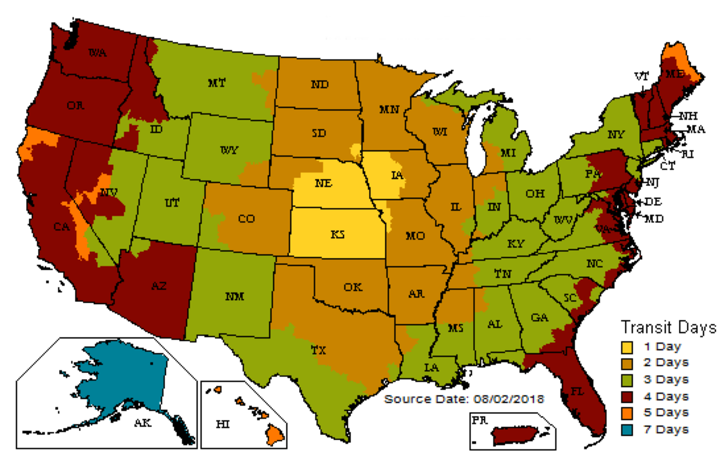
How quickly does your shipment need to reach us? The map below, showing UPS Ground transit time, can help you determine the best shipping option from your location.